
Micro FrontendsArchitectureEngineeringWebProduct
The Micro-Frontend Canvas: a practical tool for better boundaries
The Micro-Frontend Canvas is a structured one-page tool that helps teams design boundaries before they become code problems — and audit existing micro-frontends when friction shows up.

Luca Mezzalira
· 9 min read
Most teams come to micro-frontends with the same assumption: our problem is technical. We need better tooling, faster deployments, independent scaling.
Three months into the implementation, teams are stepping on each other. Boundaries that seemed logical during planning create dependencies and deployment friction. The shared design system is not actually shared. Who responds when the checkout flow breaks? Nobody answers clearly.
The Micro-Frontend Canvas exists to fix the design problem before it becomes a code problem you will struggle to undo.
Where teams actually struggle
Over the past twenty years in this industry, I have worked with more than a hundred teams worldwide, across different industries, scales, and levels of maturity: Fortune 500 companies, fast-growing startups, fintech, e-commerce, SaaS. The majority of micro-frontend failures are not due to technical skills. Teams know how to code, they understand React, Vue, deployment pipelines, CI/CD. They can build distributed systems.
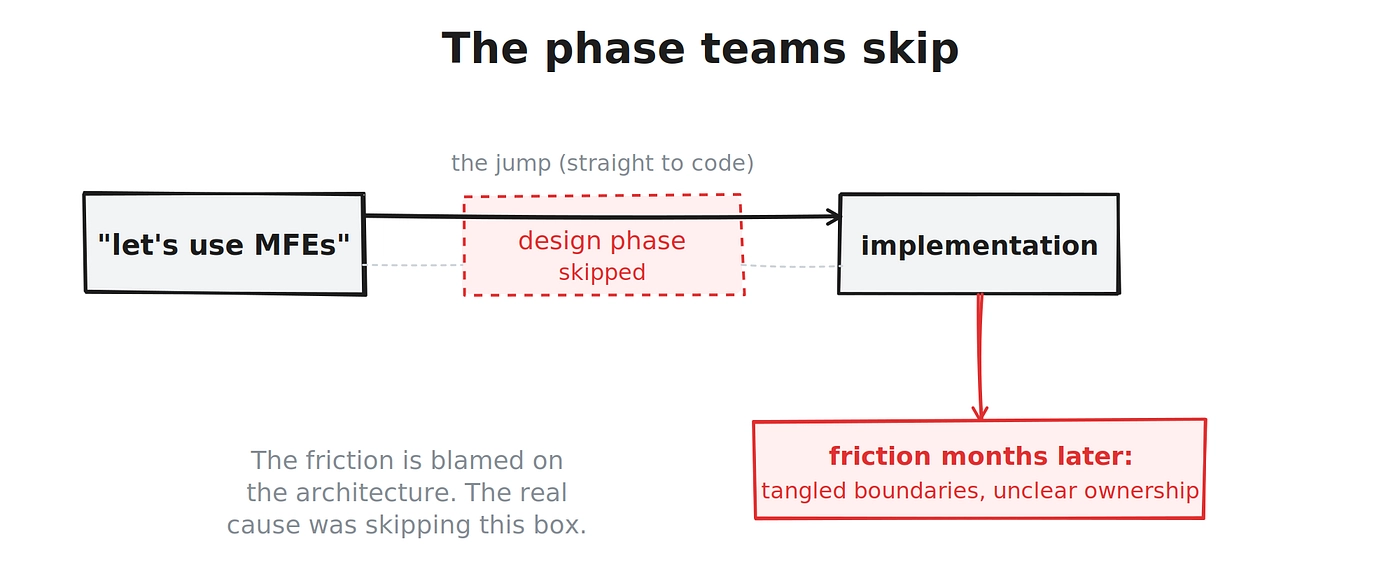
The problem is in the design phase, or more accurately, the complete absence of one. Most teams skip the decision-making part entirely. They hear “micro-frontends” and jump straight to implementation. They focus immediately on the technology side comparing frameworks and features each of them has to offer. They start coding before they have answered the questions that actually determine success:
- Is a micro-frontend the right solution for this problem at all?
- What defines a boundary, and how do we know it is the right size?
- How will teams communicate without creating tight coupling?
- Who owns the composite application when something breaks?
- What shared standards do we enforce, and how do we prevent drift across independent teams?
Without answers, you build a system that looks independent on the surface and is tangled underneath. The friction that follows gets blamed on the architecture, when the real cause is that the boundaries never matched the socio-technical reality of the organisation.
The architecture was just doing its job: surfacing a misalignment nobody designed away.
Before the canvas: should you even do this?
Micro-frontends are not for every project, and they are certainly not a silver bullet. Before the canvas comes a gate, because the most expensive micro-frontend is the one you should never have built. There are three reasons that genuinely justify the pattern:
First, scaling teams. As your organisation grows, a single monolithic frontend becomes a bottleneck. Merge conflicts, coordination overhead, and slow release cycles pile up. Micro-frontends let teams own independent slices of the application, enabling faster, safer deployments without stepping on each other.
Second, aligning architecture with business capabilities. Micro-frontends are designed around business domains, like checkout, user profiles, or dashboards, rather than around code abstractions and reusability the way components are. This alignment lets teams build, deploy, and evolve features independently while staying close to business goals.
Third, reducing risk and improving resilience. A single bug or failed release in a monolith can bring down the whole application. Micro-frontends isolate failure to a single module, so problems do not ripple across the system.
If none of these three pressures apply to you, a well-structured monolith or a modular monolith is very likely the better choice, and you should not feel any pressure to adopt a pattern built to solve problems you do not have. If you want to go deeper on this decision, it is the subject of much of my book, Building Micro-Frontends. The canvas assumes you have passed this gate honestly.
What the canvas is
The Micro-Frontend Canvas is a structured one-page tool that captures the key decisions for a single micro-frontend. The rule is simple: one micro-frontend, one canvas. It serves as a reference artifact that helps a team systematically work through the technical, organisational, and architectural concerns that will determine whether that micro-frontend succeeds.
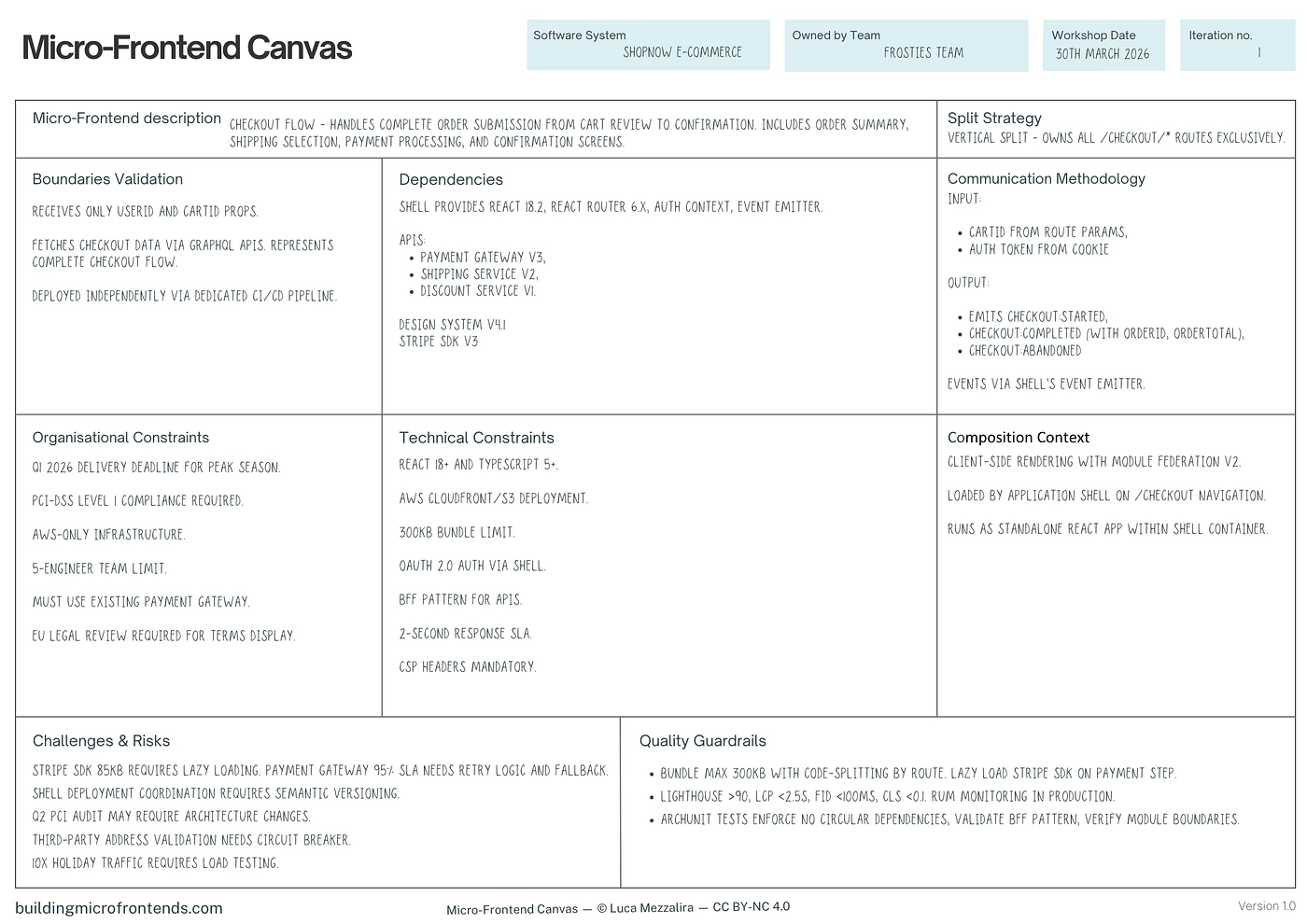
It works two ways.
In planning mode, before you write a line of code, the canvas forces your team to ask the critical questions about boundaries, constraints, dependencies, and quality standards. This prevents costly rework later and creates alignment between engineering, product, and leadership before implementation begins.
In assessment mode, if you already have micro-frontends, or you suspect your architecture is struggling, the canvas becomes a diagnostic. You use it to audit a system you already run: where are the boundaries leaking, which dependencies are hidden, where is ownership unclear, what needs to be restructured. Teams who have lived with friction for months often find that filling in a canvas for an existing micro-frontend surfaces the exact misalignment causing their pain, and does it in an afternoon rather than a post-mortem.
Either way, the canvas gives you something most organisations badly lack:
a shared language for discussing architectural complexity, one that depersonalises the conversation. The canvas critiques the design, not the person who wrote it.
How to use it, honestly
You do not need a heavyweight ceremony. The most effective way I have seen teams use the canvas is to first run a short boundary-identification session sometimes involving cross-functional stakeholders, engineers, engineering managers, architects, and product, kept deliberately small. Once you have a candidate boundary, the canvas itself is best filled in as an async reference artifact: one or two people draft it, the rest of the team reviews and challenges it asynchronously, and you converge over a day or two rather than locking fifteen people in a room.
That async-first approach came directly from teams who tested the canvas in the field, including one large financial organisation that found it worked far better as a living document than as a workshop event. Treat it as a document you return to, not a ritual you perform once. When friction emerges later, when the business shifts direction or a new feature stresses an existing boundary, you reopen the canvas and reassess. A boundary is correct for a moment in time, not forever. The canvas is how you keep checking.
What a section actually looks like
Abstract descriptions of canvas sections are not very useful, so here is one section applied, using a checkout micro-frontend as the subject.
Take the Boundaries validation section. Its job is to test whether the boundary you have drawn is the right size and genuinely independent. The guiding questions are deliberately uncomfortable:
- Can this micro-frontend be deployed without coordinating with any other team?
- What data does it own, and what does it borrow?
- If it needs data from another domain, how does it get it without a runtime dependency on that team’s code?
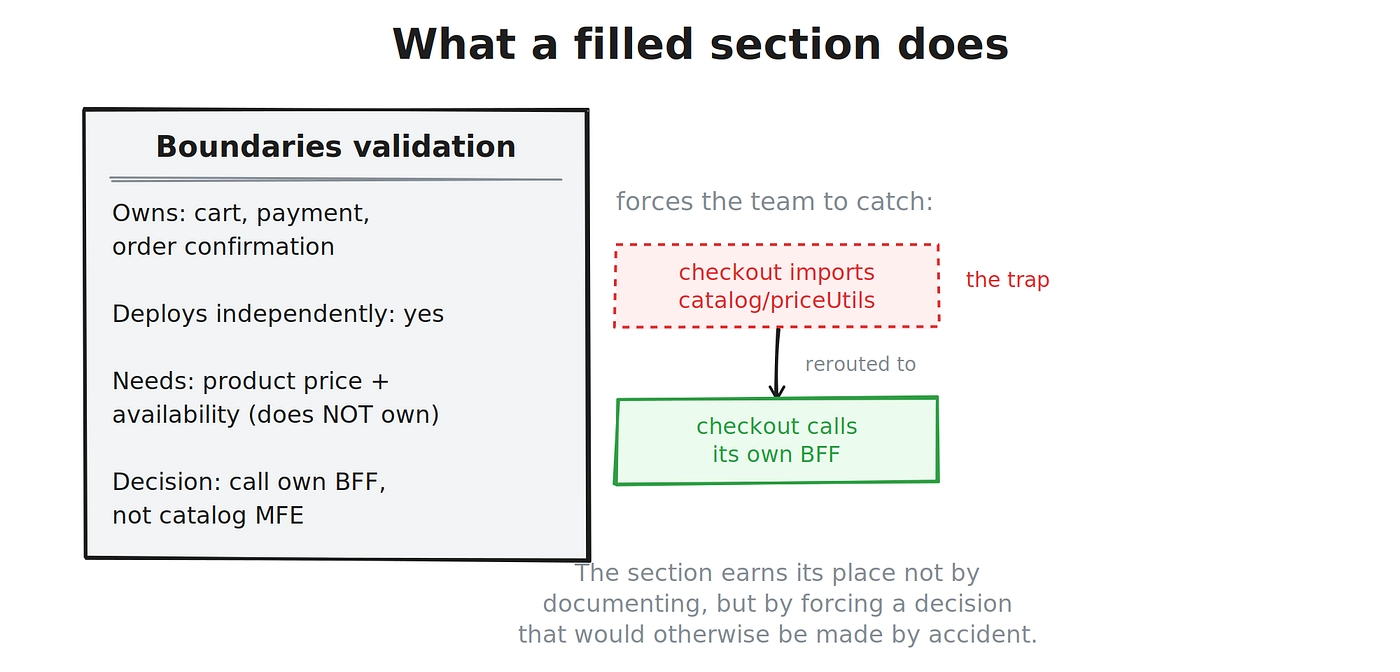
Filled in for checkout, it might read: “Checkout owns the cart, payment, and order-confirmation flow. It deploys independently. It needs product price and availability, which it does not own. Decision: checkout calls its own backend-for-frontend, which aggregates pricing, rather than importing from the catalog micro-frontend or sharing a store with it.”
That single filled-in section does real work. It exposes the most common hidden dependency in e-commerce, the one where checkout quietly reaches into catalog for a formatting helper or a price object, and it forces the team to decide on a clean alternative before the coupling is written into the code. This is the canvas earning its place: not by adding documentation, but by forcing a decision that would otherwise be made by accident, three sprints in, by whoever was on the keyboard.
The full canvas carries this same treatment across every section, and the PDF guide includes a complete worked example end to end.
The sections that matter
Each section guides a team through a specific class of decision. Business capability asks what problem this micro-frontend solves and which business subdomain it represents, as opposed to which UI it happens to render. Boundaries validation, shown above, tests size and independence. Dependencies surfaces what the micro-frontend needs, and critically, whether a corresponding backend boundary exists, because a checkout micro-frontend claiming independent deployment is not independent if it sits on a monolithic backend coordinated by another team. Communication methodology captures how this micro-frontend talks to others, the contracts involved, how those contracts are tested, and who owns them. Governance and observability answers the question teams most often defer until an incident: who owns this in production, what standards it must meet, and how shared dependencies are managed. Quality guardrails records the standards you will enforce. Challenges and risks names what could go wrong while you can still design around it.
None of these are technical questions in the narrow sense. They are decisions about ownership, alignment, and trade-offs, expressed precisely enough that the code which follows has something true to be built against.
From canvas to code, and to your AI agent
Here is where the canvas matters more in 2026 than it did when I first designed it.
A filled-in canvas is a set of architectural decisions written down precisely: this is the boundary, this is what crosses it, this is how it communicates, this is who owns it. That is exactly the input modern development now runs on. Whether you call it spec-driven development or context engineering or harness engineering, the principle is the same: the quality of what your tools build depends on the quality of the decisions you feed them. The canvas produces those decisions in a form a team, and increasingly an AI coding assistant, can build against.
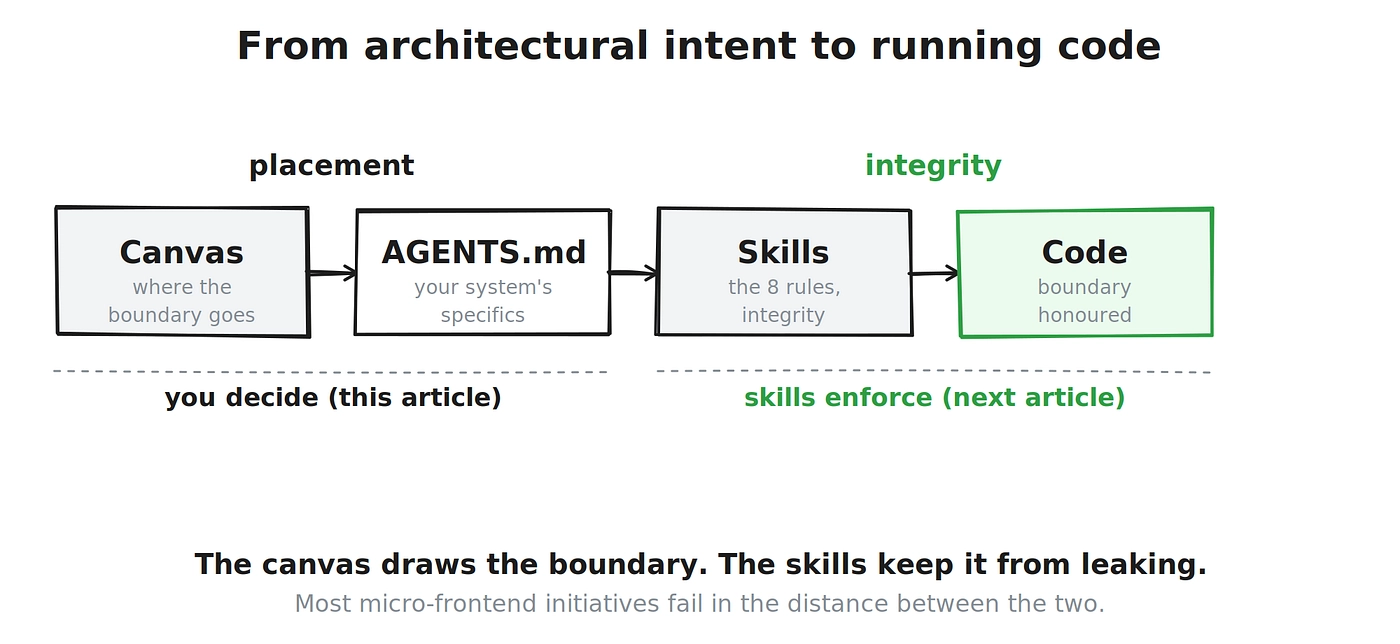
When you hand a boundary to an AI agent, the agent will scaffold it fast and confidently, and it will reach for tutorial defaults that quietly dissolve the very boundary you designed: cross-imports between micro-frontends, shared global stores, fat contracts passing whole domain objects across team lines. The canvas decides where the boundary goes. It cannot, on its own, stop the code from leaking it.
That second half, keeping a boundary intact once you have drawn it, is a different problem, and it is the one I take up next. I have packaged a set of boundary rules that protect a boundary’s integrity into a set of skills your AI assistant loads as it writes, so the decisions captured in your canvas are actually honoured in the code your agent produces. The canvas draws the boundary while the skills keep it from leaking. Together they cover the full distance from architectural intent to running code, which is the distance where most micro-frontend initiatives quietly fail. I’ll follow up with an in depth article on the skills and how I used them in projects.
Why it is free
The canvas is released under Creative Commons, free to use, share, and adapt for non-commercial purposes. It exists to solve an industry problem, not to be a product. The goal is to democratise architectural thinking that has mostly lived in the heads of expensive consultants and put it in the hands of any team that needs it.
To be clear about what the free tool does and does not replace: the canvas democratises the questions, the structure, the shared language. The judgement of how to answer those questions in your specific political and technical context, where the trade-offs genuinely bite, is the harder thing, and it is built through experience. The canvas does not remove the need for that judgement. It makes the judgement visible, teachable, and reviewable, which is the most useful thing a tool in this space can do.
How to start
If you are planning new micro-frontends, run the boundary session, then fill in one canvas per micro-frontend before you commit to implementation. If you already have micro-frontends and something feels wrong, take your most painful one and fill in a canvas for it as it exists today. The gaps you cannot fill in cleanly are almost always where your friction is coming from.
Either way, this is a living tool, and it gets better when teams use it and tell me what they learn. Download it, use it, and tell me what worked and what it missed.
The boundaries were never really the problem. Not designing them, and not protecting them once designed, was. The canvas is where you start fixing that.